
You will find "Time sheet" under the heading "Time" in the self-service portal. Here you can see your registered hours.
Click on the tile Time sheet.
Click Download to open the applicable time sheet.
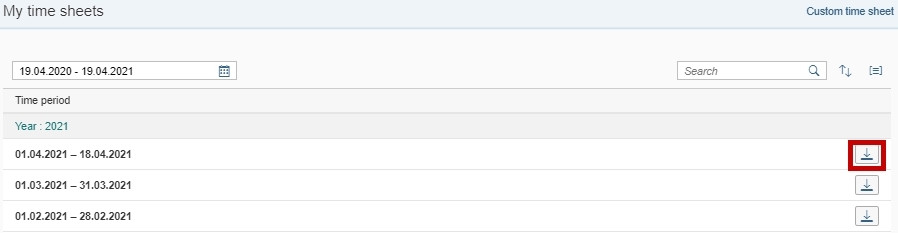
The time sheet will be automatically updated every night, which means that your new registrations will not be visible until the next day. Your absence requests must be approved before they will appear in the time sheet.
You can search for a specific month in the Search-field and do a specific period search by clicking Custom time sheets.

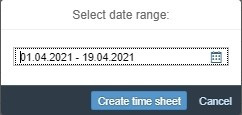
Here you can enter the period you want to view. Click Create time sheet to see the time sheet for the selected period.
You can use Group table rows to change the order of the time sheets.
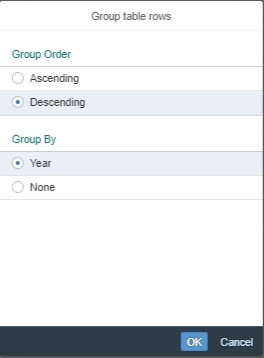
Your timesheet is updated every night. This means that any time registrations entered under Register working hours will not be reflected until the following day. For absence requests to update the timesheet, they must be approved.
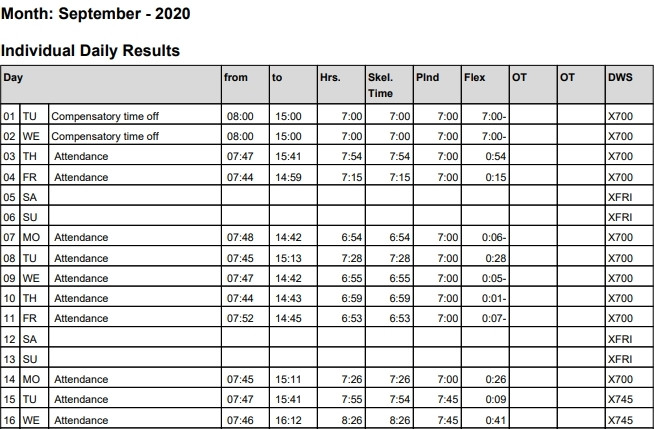
Individual results per day:
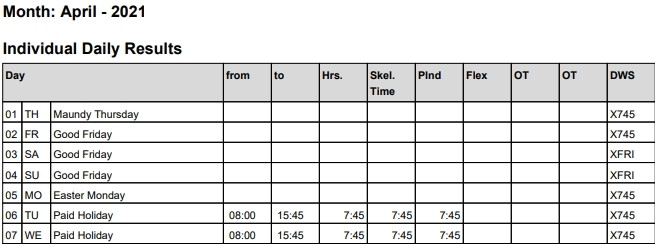
The timesheet will be in a PDF format when printing or downloading. You can save the time sheet on your computer or print it by clicking one of the icons.

Description of terms
- Hrs: The total amount of hours and minutes registered
- Cred: hours: Hours registered according to regulations
- Plan: The total hours planned according to the work schedule rule
- Flex: The change in the compensatory time balance after registration
- Daily schedule: A technical description of your work schedule. The numbers often indicate the length of the workday.
You will also find a monthly overview with useful information.
Below is an explanation of overtime types:
- Basic collective agreements for the civil service overtime: Overtime hours paid in accordance with the Basic collective agreements for the civil service
- Working Environment Act overtime: Overtime hours calculated in accordance with the Working Environment Act
Example of the difference between Basic collective agreements for the civil service overtime and Working Environment Act overtime:
An employee is required to work 1,5 hours of overtime in addition to their regular working day of 7,5 hours. The employee works a total of 9 hours and is paid for 1,5 hours of Basic collective agreements for the civil service overtime
According to the Working Environment Act, the standard daily working time is up to 9 hours. This means the employee must work 9 hours before Working Environment Act overtime is calculated. In this case, no Working Environment Act overtime is registered.
Contact
Do you have questions about the content of this page?
Contact our customer service centre
- lonn [at] dfo.no (lonn[at]dfo[dot]no)
- (+47) 40 63 40 21